| Author |
Message |
|
|
Post subject: Dateischredder GUI?
 Posted: Mar 16, 2011 - 01:54 PM Posted: Mar 16, 2011 - 01:54 PM
|
|
Joined: Jan 04, 2007
Posts: 1604
Location: Hamburg
|
|
Hallo Ihr,
kennt Ihr eine GUI-Möglichkeit, eine Partition zu schreddern, so daß die Daten nicht mehr wiederhergestellt werden können?
Ich habe es jetzt mit dem schred /dev/sdx gemacht, aber gui fänd ich noch schöner...
Wißt Ihr da Bescheid?
Kann ich das sonst nicht ziemlich einfach mit dem QT-4 Designer selber bauen? Oder sollte ich zenity oder dialog verwenden? Was wäre am einfachsten?
Viele Grüße Christopher |
_________________
Es ist dem Untertanen untersagt, den Maßstab seiner beschränkten Einsicht an die Handlungen der Obrigkeit anzulegen - Kurfürst Friedrich Wilhelm von Brandenburg
www.projektidee.org | www.gesundheitstabelle.de | www.neoliberalyse.de
|
| |
|
|
|
 |
|
|
|
Post subject: Dateischredder GUI?
Posted: Mar 16, 2011 - 04:52 PM
|
|
Developer


Joined: Jul 10, 2004
Posts: 290
Location: Bayern (München & Rottenburg)
|
|
wie wär's denn einfach mit nem ServiceMenu-Eintrag?
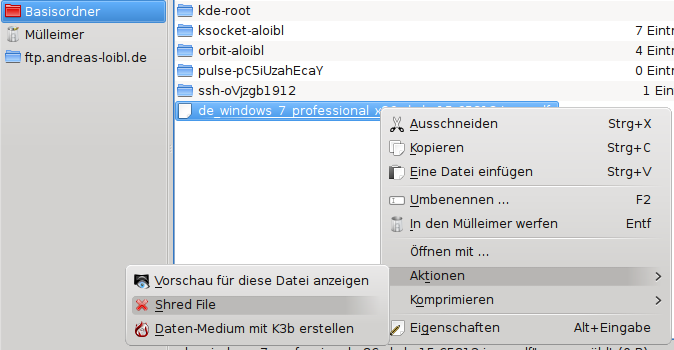
Code:
mkdir -p ~/.kde/share/kde4/services/ServiceMenus
cat <<"EOF" > ~/.kde/share/kde4/services/ServiceMenus/shred.desktop
[Desktop Entry]
Actions=ShredFile;
Type=Service
ServiceTypes=KonqPopupMenu/Plugin
MimeType=all/all;
[Desktop Action ShredFile]
Exec=shred -u %F
Name=Shred File
Icon=edit-delete
StartupNotify=false
Terminal=false
TerminalOptions=
EOF
danach Dolphin neu starten und du hast nen "Shred File"-Eintrag im Kontextmenü unter Aktionen
dass shred allerdings nicht so viel bringt, v.a. bei SSDs sollte dir allerdings auch klar sein...
acritox |
_________________
http://kanotix.acritox.com/factoids - http://kanotix.acritox.com - http://acritox.de/repository - http://andreas-loibl.de - GPG: F781E713
|
| |
|
|
|
|
|
|
|
Post subject: Dateischredder GUI?
Posted: Mar 16, 2011 - 05:02 PM
|
|
Developer
Joined: Jul 10, 2004
Posts: 290
Location: Bayern (München & Rottenburg)
|
|
ach mist, ich hab das "Partition" ganz überlesen...
also dann: ich würds einfach mit nem kleinen Script machen und z.B. KDialog:
Code:
#!/bin/sh
IFS="
"
devs="$(awk -vli="$(awk '{if($2=="sd") print $1;}' /proc/devices)" \
'BEGIN{m=split(li,list," ")}{for(i=1;i<=m;i++) if($1==list[i]) print "/dev/"$4"\n/dev/"$4"\t"$3;}' /proc/partitions)"
if dev="$(kdialog --menu "Select device to shred:" $devs)"; then
[ -w "$dev" ] && shred "$dev" || /usr/lib/kde4/libexec/kdesu -- shred "$dev"
kdialog --msgbox "shred $dev finished."
fi
acritox |
_________________
http://kanotix.acritox.com/factoids - http://kanotix.acritox.com - http://acritox.de/repository - http://andreas-loibl.de - GPG: F781E713
|
| |
|
|
|
|
|
|
|
Post subject: Dateischredder GUI?
Posted: Mar 16, 2011 - 05:43 PM
|
|
Joined: Jan 04, 2007
Posts: 1604
Location: Hamburg
|
|
| Super, vielen Dank dafür! Kann man in die GUI des Scripts auch noch einblenden, welche Geräte eingehängt sind, weil man sonst immer gparted erstmal starten muß, um dort zu schauen, welche /dev/xxx zu dem jeweiligen Gerät gehört... |
_________________
Es ist dem Untertanen untersagt, den Maßstab seiner beschränkten Einsicht an die Handlungen der Obrigkeit anzulegen - Kurfürst Friedrich Wilhelm von Brandenburg
www.projektidee.org | www.gesundheitstabelle.de | www.neoliberalyse.de
|
| |
|
|
|
|
|
|
|
Post subject: Dateischredder GUI?
Posted: Mar 16, 2011 - 06:46 PM
|
|
Developer
Joined: Jul 10, 2004
Posts: 290
Location: Bayern (München & Rottenburg)
|
|
nur unbenutzte (also nicht gemounted und nicht als swap verwendete) Partitionen auflisten:
Code:
#!/bin/sh
IFS="
"
devs="$(awk -vli="$(awk '{if($2=="sd") print $1;}' /proc/devices)" \
'BEGIN{m=split(li,list," ")}{for(i=1;i<=m;i++) if($1==list[i]) print "/dev/"$4"\n/dev/"$4"\t"$3;}' /proc/partitions \
| grep -vwF "$(grep -hoe '^/dev/[^ ]*' /etc/mtab /proc/swaps)" | grep -vwF "$(grep -hoe '^/dev/[^0-9]*' /etc/mtab /proc/swaps)")"
if dev="$(kdialog --menu "Select device to shred:" $devs)"; then
[ -w "$dev" ] && shred "$dev" || /usr/lib/kde4/libexec/kdesu -- shred "$dev"
kdialog --msgbox "shred $dev finished."
fi
acritox |
_________________
http://kanotix.acritox.com/factoids - http://kanotix.acritox.com - http://acritox.de/repository - http://andreas-loibl.de - GPG: F781E713
|
| |
|
|
|
|
|
|
|
Post subject: Dateischredder GUI?
Posted: Mar 18, 2011 - 07:32 AM
|
|
Joined: Jan 04, 2007
Posts: 1604
Location: Hamburg
|
|
| Das letzte Update Deines Scripts geht bei mir nicht, wirft aber auch keine Fehlermeldung aus. |
_________________
Es ist dem Untertanen untersagt, den Maßstab seiner beschränkten Einsicht an die Handlungen der Obrigkeit anzulegen - Kurfürst Friedrich Wilhelm von Brandenburg
www.projektidee.org | www.gesundheitstabelle.de | www.neoliberalyse.de
|
| |
|
|
|
|
|
|
|
Post subject: Dateischredder GUI?
Posted: Mar 18, 2011 - 11:02 AM
|
|
Developer
Joined: Jul 10, 2004
Posts: 290
Location: Bayern (München & Rottenburg)
|
|
|
|
|
|
|
|
|
Post subject: Re: Dateischredder GUI?
Posted: Apr 23, 2012 - 06:07 PM
|
|
Joined: Jan 17, 2012
Posts: 16
|
|
|
stalin2000 wrote:
Hallo Ihr,
kennt Ihr eine GUI-Möglichkeit, eine Partition zu schreddern, so daß die Daten nicht mehr wiederhergestellt werden können?
die Antwort kommt zwar etwas spät. Für spätere Dinge etwa:
Die DBAN LiveCD ist dafür sehr(!) gut geeignet. |
|
|
| |
|
|
|
|
|
|
|
Post subject: GUI für wipe
Posted: Apr 24, 2012 - 06:55 AM
|
|
Joined: Jun 22, 2004
Posts: 463
Location: Wegberg
|
|
|
|
|
|
|
|
|
Post subject: GUI für wipe
Posted: Apr 25, 2012 - 09:03 PM
|
|

Joined: Jul 08, 2006
Posts: 976
Location: Sömmerda / Thüringen
|
|
|
|
|
|
|
|


